Remotion & Claude Code: Programmatic Video Realities

Remotion: Why This Matters Now?
Remotion is an innovative, open-source video editing framework. It empowers users to create sophisticated motion graphics programmatically, using familiar React code and JavaScript. This transforms traditional visual elements into editable, scalable code.
For decades, producing high-quality motion graphics and explainer videos was a manual, labor-intensive process. Video editors and motion designers spent countless hours in complex graphical user interfaces (GUIs) like Adobe After Effects or Premiere Pro. They painstakingly dragged clips, set keyframes by hand, and re-rendered entire timelines for even minor client revisions.
The landscape changed significantly with the rise of generative AI tools. Remotion recently released an “Agent Skill,” essentially an instruction manual for AI coding agents such as Claude Code, Google Antigravity, and Cursor. This skill provides large language models with the architectural knowledge needed to write Remotion code, enabling humans to direct complex video animations with simple, plain English prompts.
The viral hype around this integration has caused confusion. Some creators claim video editors are obsolete, while others dismiss the output as rigid or overly technical. To understand the nuances, I analyzed dozens of real attempts, including insights from a comprehensive breakdown of the Remotion and Claude Code workflow, aiming to separate reality from hype. This post explores the exact mechanisms, common failures, and consistent successes observed when everyday users tried to replace their editing timelines with terminal commands.
How I Approached This Analysis
To truly grasp the capabilities and limitations of programmatic video generation, I meticulously studied dozens of real-world attempts across platforms like YouTube, X (formerly Twitter), and various developer forums. My analysis covered a diverse range of users: from seasoned software engineers building dynamic data visualizations to non-technical marketers crafting promotional advertisements, and agency owners seeking scalable production workflows.
I reviewed precise prompts, terminal setups, recurring errors, and the iterative troubleshooting required to achieve a final MP4 file. Hours of unedited screen recordings allowed me to observe Claude Code’s real-time interaction with the Remotion environment.
My insights are derived from these observed, verifiable patterns. I don’t claim to have personally built a million-dollar agency using these videos; instead, my goal is to synthesize the friction, breakthroughs, and best practices that consistently emerge when people endeavor to “vibe code” motion graphics. This includes detailed analyses of the programmatic video workflow and its challenges.
What People Expect to Happen
When beginners first encounter a viral post about Claude Code generating a video, their expectations often diverge significantly from reality.
The Magic Generator Misconception
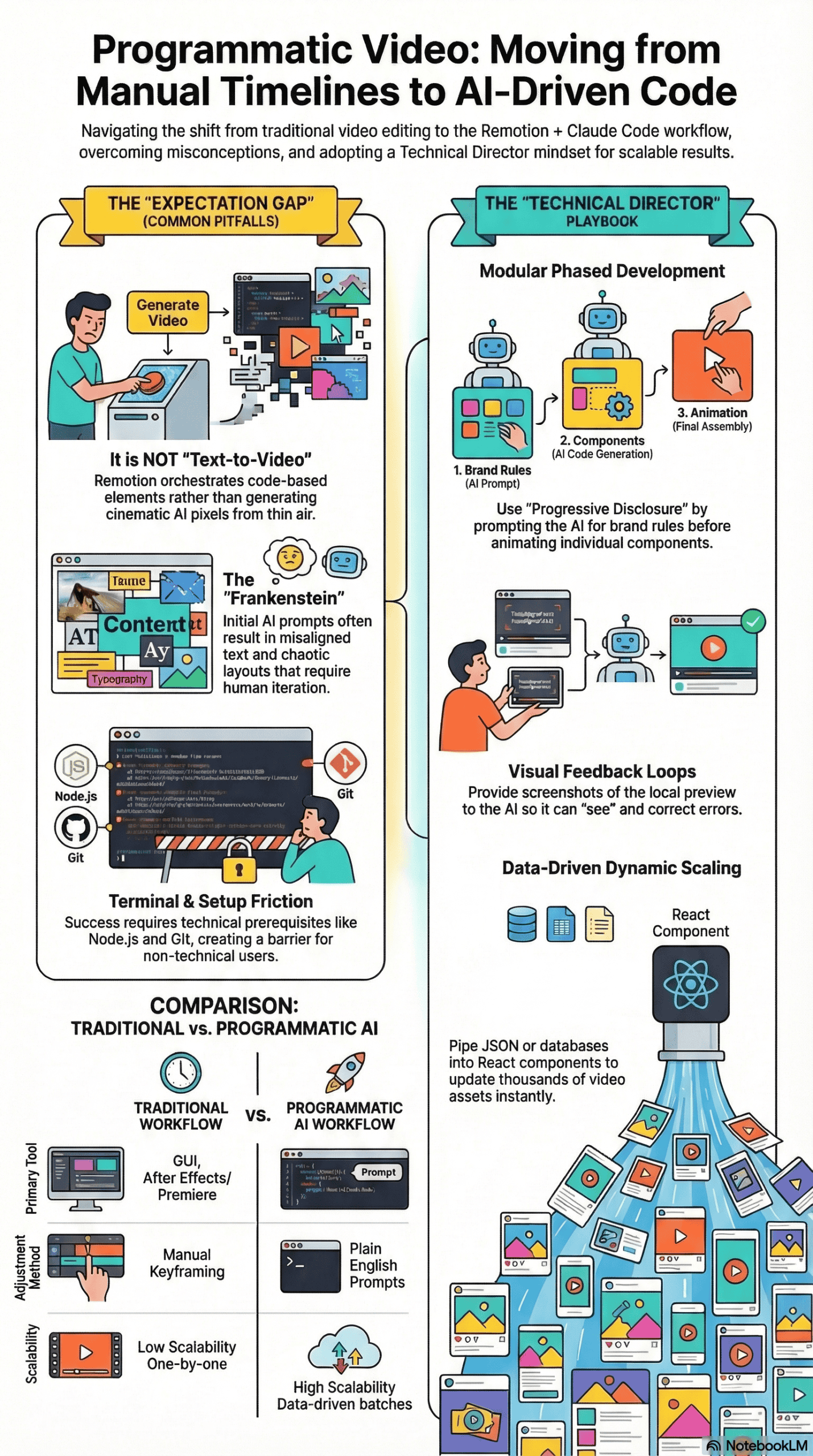
Tools like OpenAI’s Sora or Google’s Veo have popularized “text-to-video” generation. This often leads people to assume the Remotion integration operates similarly. They expect to type, “Create a cinematic video of a spaceship flying through Mars,” and magically receive highly realistic, pixel-perfect video footage generated from scratch.
The One-Shot Illusion
Another common expectation is that complex, multi-scene product demos can be generated with a single, vague prompt. Beginners often believe they can simply pass a URL to the AI agent, ask it to “make a cool, modern promotional video,” and anticipate a broadcast-ready final product in under two minutes.
The “No Effort” Fallacy
Finally, an overarching optimism suggests AI agents require zero creative direction. New users expect the AI to inherently possess excellent taste, intuitively knowing which font sizes to use, how to space elements, and how to pace animations for maximum viewer retention. They assume that since they aren’t manually editing the video, they also don’t need to actively direct it.
What Actually Happens in Practice
What truly unfolds when a user attempts to build a Remotion project with Claude Code is far more structured, and sometimes more frustrating, than viral demonstrations suggest. The real experience typically follows a specific progression.
The Setup Phase: Terminal Intimidation
The journey almost always begins in the command line interface (CLI). Users must install prerequisites like Node.js and Git. From there, they use their terminal to initialize a blank Remotion project and install the “Remotion Best Practices” agent skill. For non-technical users, staring at a terminal window and typing commands like npx create-video creates significant early friction.
The First Prompt: The “Frankenstein” Output
Once the environment is running and a localhost preview is open in their browser, users submit their first prompt. Claude begins writing React code components, managing CSS, and rendering HTML elements programmatically. The initial result is rarely good. Users frequently watch their screens load only to find misaligned text, overlapping images, chaotic transitions, or assets rendering entirely outside the visible frame.
The Iterative Breakthrough
This is where the true workflow emerges. Users quickly realize that Remotion does not generate new video pixels; it orchestrates existing elements using code. To fix a broken layout, they must take a screenshot of the local preview, feed it back into Claude Code, and explicitly point out the errors. They might say, “The cursor is misaligned with the button,” or “The title text is overlapping the hero image.”
Claude then updates the specific React component, and the user watches the video update in real-time. The experience shifts from initial frustration to empowerment. They aren’t generating a video; they are directing a highly capable, though sometimes confused, technical motion designer.
The Most Common Failure Points
In reviewing these workflows, I noticed several consistent failure points that almost invariably lead to a broken, unusable video.
-
The “Kitchen Sink” Prompt: Asking for too much at once is the fastest way to crash the workflow. Users who attempt to generate a 30-second, 10-scene video with complex motion graphics in a single prompt consistently fail. The AI agent becomes overwhelmed by the context window, loses track of its React components, and outputs a disorganized mess where the code breaks or the timeline logic fails completely.
-
Skipping the Art Direction: Many users jump straight into asking for specific animations without first defining the rules of their visual world. If the AI isn’t given explicit brand constraints—like primary hex codes, typography rules, and spacing guidelines—it will hallucinate design patterns. This results in a video where scene one looks corporate, scene two resembles a cartoon, and scene three uses generic, unappealing default styles.
-
Failing to Provide “Eyes” to the Agent: AI coding agents are practically blind unless you provide them with visual context. A recurring problem occurs when a user asks the agent to use local images (such as logos or product shots) but fails to show the agent what those images actually look like. The code might successfully reference an asset named
logo.png, but without a visual reference, the AI won’t know the logo is horizontal and will squish it into a vertical square. -
Confusing Video Generation with Motion Graphics: Users frequently ask Remotion to “create a realistic video of a person talking.” Remotion cannot do this; it is not a diffusion model. Remotion requires pre-existing assets – images, SVGs, or raw video footage—placed into a local
/publicfolder. It then animates, layers, and sequences them via code. When users fail to provide high-quality assets, the final video appears incredibly amateurish.
What Consistently Works (Across Many Experiences)
Despite the hurdles, I observed a consistent pattern of success among advanced users who managed to produce broadcast-quality motion graphics.
The “Progressive Disclosure” prompting method involves feeding an AI agent small, sequential tasks. For example, establish brand colors first, build individual components second, and assemble the final timeline last. This approach prevents context overload and ensures clean, modular code generation.
-
Modular, Phased Development
The most successful creators treat video generation akin to software architecture. They break the process into distinct, sequential phases:
- System Setup: They first prompt the AI to define a brand schema, locking in colors, fonts, and universal styling logic in a core configuration file.
- Storyboarding: Instead of animating immediately, they ask the AI to write a text-based storyboard mapping out the exact pacing and flow of each scene.
- Asset Generation: They define an asset inventory, pointing the AI to the local
/publicdirectory to analyze all required SVGs, PNGs, and audio files. - Assembly: Finally, they prompt the AI to build the timeline scene by scene, ensuring each component functions correctly before moving to the next.
-
Providing Visual Feedback Loops
Successful users consistently rely on visual feedback. When a layout is incorrect, they take a screenshot of the Remotion Studio preview, drop the image back into the Claude Code terminal, and provide precise corrective instructions. They also utilize tools like the Claude browser control or Cursor’s integrated preview to allow the agent to “see” its own mistakes and autonomously fix overlapping layers or poorly timed transitions.
-
Leveraging External MCP Servers
To overcome Remotion’s inability to generate raw media, advanced users connect their coding agents to external APIs using the Model Context Protocol (MCP). I consistently noticed users employing ElevenLabs to generate voiceovers and sound effects, and NanoBanana to generate custom background images. The coding agent handles the API request, downloads the generated audio or image file into the project folder, and dynamically stitches it into the Remotion timeline.
-
Data-Driven Dynamic Animations
Because Remotion is built on React, users achieve great success by piping raw data directly into their videos. Rather than manually typing out titles or numbers, they feed the agent a JSON file or connect it to a Supabase database. This enables the AI to programmatically generate animated bar charts, dynamic dashboards, or large batches of personalized lower-thirds that update instantly when the underlying data changes.
What I Would Do Differently If Starting Today
Based on everything I’ve analyzed across these experiences, jumping straight into a terminal and demanding a video is a recipe for frustration. If I were advising someone starting their programmatic video journey today, here is the concrete approach I would take.
-
Treat the AI as an Architect, Not a Magician
I would explicitly separate creative direction from execution. Before opening the terminal, I would gather all my high-resolution assets – logos, transparent PNGs, font files, and raw video clips – and organize them neatly in a project folder. I would also write a plain-text design document detailing exactly what I want the video to look and feel like, preventing the AI from making assumptions about my brand.
-
Adopt a Visual Workspace
While the default command-line interface works, I would strongly recommend using an integrated development environment (IDE) like Cursor or Google Antigravity. These environments offer better file tree visibility, making it much easier to see the React components Claude is generating. They also provide native terminal access and integrated browser previews, saving you from constantly tabbing back and forth between windows.
-
Establish Reusable “Motion Primitives”
Rather than micromanaging every single keyframe, I would ask the agent to establish universal “motion primitives” early in the process. For example, I would prompt: “Create a standard fade-and-slide-up animation with spring physics that we will use for all text elements.” By baking these rules into the core code, the agent applies consistent, cohesive animation styles across the entire video without needing to be told how to move every single text box.
-
Batch Process Whenever Possible
If I were creating a video with multiple complex graphics, I would use parallel agents. I would have one agent researching and generating audio via ElevenLabs, while the primary agent focuses solely on laying out the React components for the video framework. By keeping tasks batched and siloed, you prevent the language model from losing its context and hallucinating bad code.
Final Remotion Takeaway: The Honest Version
The Claude Code and Remotion workflow is not a magical, one-click solution that will instantly replace human creativity or taste. If you expect to type a single sentence and receive a cinematic masterpiece, you will be deeply disappointed.
However, if you view this workflow as a way to turn video editing into a programmable configuration problem, it is undeniably revolutionary. What most people get wrong is trying to treat an AI coding agent like a traditional video timeline. The truth is, this process consistently works only when you act as a meticulous technical director: setting rigid brand constraints, providing high-quality raw assets, and guiding the AI through modular, step-by-step builds.
Ultimately, this integration eliminates the grueling, repetitive labor of manual keyframing and layer adjustments. It empowers non-technical users to build scalable, data-driven motion graphics, leaving you with more time to focus on what actually matters—the storytelling and the creative vision.