Nano Banana 2 vs Nano Banana Pro: Choosing the Right AI

Why This Topic Matters Now
Google’s Nano Banana 2 has sparked both confusion and excitement among digital design, marketing, and AI enthusiasts. For months, creators had to choose between the original Nano Banana model, which was fast but often produced blurry or anatomically incorrect images, and Nano Banana Pro, which delivered impressive studio-quality images but was notoriously slow and expensive.
Nano Banana 2, officially known as the Gemini 3.1 Flash Image model, changes this landscape. It aims to combine the Pro model’s advanced capabilities with the lightning-fast generation speeds of a flash model.
However, common online advice is often misleading. Many users assume that because Nano Banana Pro requires paid subscriptions, it’s automatically superior for every use case. This assumption wastes time, credits, and creates inefficient workflows. This analysis delves into the real-world performance of both models to uncover their strengths, weaknesses, and how professionals truly utilize them daily.
How This Analysis Was Approached
To look beyond marketing claims, a comprehensive study was conducted, examining dozens of real attempts, side-by-side comparisons, and rigorous stress tests from professional designers, architects, and AI automation experts. Results from platforms like Google Gemini, Google AI Studio, and third-party aggregators were meticulously reviewed.
This analysis did not rely on simple, generic prompts. Instead, it explored complex workflows, including architectural floor plan renderings, multi-character consistency tests, dense typographical layouts, and hyper-realistic portrait photography. By observing these patterns across many real experiences, the exact capabilities and limitations of both Nano Banana 2 and Nano Banana Pro were pinpointed. The insights presented here come from direct observation and structured testing, not just personal opinions.
What People Expect to Happen
Beginners typically harbor two main expectations when first engaging with these advanced AI image generators.
- The “Pro” label guarantees superiority. Since Nano Banana Pro (Gemini 3 Pro Image) costs significantly more credits and requires a premium subscription, users naturally assume it will easily outperform the free or cheaper Nano Banana 2 for all tasks, from text generation to complex spatial reasoning.
- Instant perfection from plain language. Many mistakenly believe they can simply type a vague sentence into the prompt box, and the AI will perfectly understand their artistic vision. Beginners often expect the AI to automatically manage lighting, camera angles, aspect ratios, and character consistency without specific instructions, expecting the AI to read their mind rather than act as a machine requiring structured, logical commands.
What Actually Happens in Practice
When these models are put to the test, their usage unfolds quite differently from expectations. Users often get excited about Nano Banana 2 primarily due to its remarkable speed.
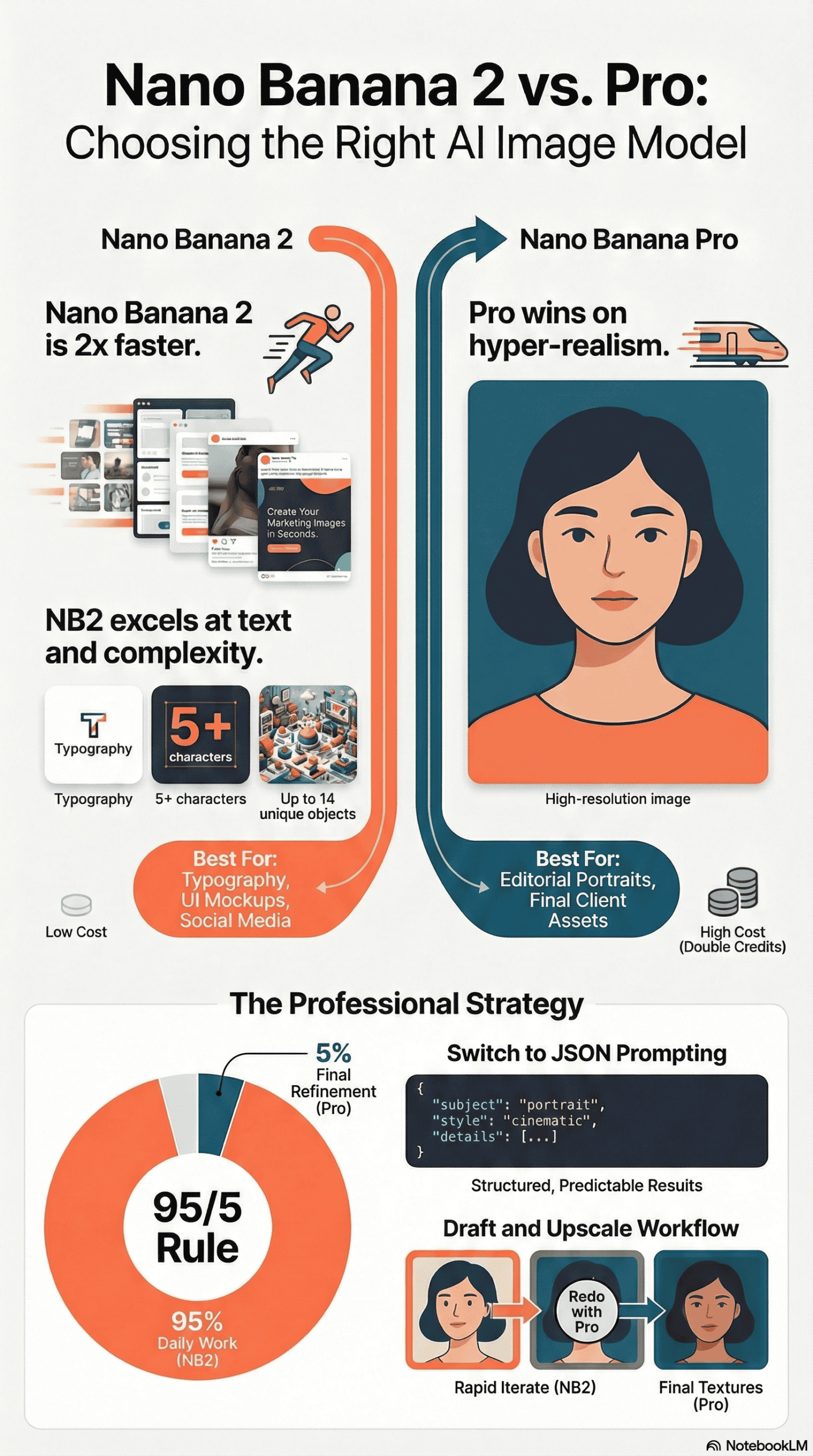
In speed tests, Nano Banana 2 generated a photorealistic image of a matte black water bottle in approximately 15 to 16 seconds. Nano Banana Pro, however, required about 34 to 35 seconds for the same prompt. This makes the new Flash model roughly twice as fast, a significant advantage as highlighted in this video analysis comparing their generation speeds.
The challenge arises when users try to determine which model produces a “better” image. In practice, Nano Banana 2 often upends the typical hierarchy. When tasked with generating a complex software pricing page on a laptop screen—a test demanding precise text rendering, column alignment, and accurate spelling—Nano Banana 2 performs remarkably well. It renders headlines, pricing tiers, and even fine print with near-perfect accuracy. While Nano Banana Pro also does well, users frequently note that Nano Banana 2’s text rendering is equally good, and sometimes more legible in infographic contexts.
Character consistency also frequently surprises users. Nano Banana 2 was specifically upgraded to maintain the resemblance of up to five different characters and the accuracy of up to 14 specific objects within a single generated frame. When tested with a prompt requiring five uniquely dressed individuals and 14 camping items (such as tents, lanterns, and backpacks), Nano Banana 2 successfully placed all characters and objects with correct proportions and natural anatomy.
However, when the goal is hyper-realistic, editorial-style photography—such as a close-up portrait featuring natural skin texture, stubble, and precise depth of field—the “Flash” model’s limitations become apparent. While Nano Banana 2 produces excellent, usable images, Nano Banana Pro consistently creates more photorealistic images, boasting superior cinematic lighting and microscopic detail, than its faster counterpart.
The Most Common Failure Points
Despite major technological advancements, users consistently encounter specific failures when utilizing these models. Based on observed patterns, these failures typically stem from structural problems, bad advice, and unrealistic assumptions.
- Relying on basic, plain-text prompts: Many users write vague descriptions and treat the AI like a slot machine, hoping for a good result. Because plain text lacks structure, the AI guesses at lighting, camera angles, and layout, leading to inconsistent and frustrating outputs.
- Stumbling on highly specific spatial translations: Both models can falter when asked for precise spatial arrangements. For instance, rendering a 2D architectural floor plan as a realistic 3D top-down view sometimes causes Nano Banana 2 to alter spatial arrangements, add random elements, or mess up a staircase’s flow. Similarly, generating a photo of a specific room from a particular corner based on a floor plan often results in the AI facing the wrong direction or placing furniture incorrectly.
- Failing deliberate logical stress tests: While both models have improved, they still struggle with specific logical constraints. If you explicitly ask for a hand with exactly seven fingers, a clock displaying a very specific time, and a wine glass filled perfectly to the brim in the same prompt, both models will almost always fail. Nano Banana 2 tends to default back to five fingers regardless of the prompt, and both models struggle with the mathematical precision needed for analog clock hands.
- Using Nano Banana Pro for unnecessary tasks: Users often fail by deploying Nano Banana Pro for tasks that do not require its advanced capabilities. Since Pro costs more than double the credits of Nano Banana 2, using it for basic social media graphics, flat-lay illustrations, or simple brainstorming concepts rapidly depletes budgets without providing a noticeable upgrade in quality.
What Consistently Works (Across Many Experiences)
While clear limitations exist, many professional workflows demonstrate repeatable patterns of success. Specific techniques and features consistently yield impressive results.
JSON Prompting for Absolute Control
JSON prompting is the most effective technique observed in expert workflows. Instead of writing a paragraph, users format their prompts like code. They use JSON schema to strictly define arguments such as “subject,” “lighting,” “camera_angle,” “lens,” and “aspect_ratio.” As explained in a detailed tutorial on advanced prompting, since AI models understand structured data, JSON prompting eliminates guesswork. It compels the model to adhere precisely to the requested framing and style, consistently producing high-quality, predictable results instead of random guesses.
Using the Built-in Style Picker
For users who prefer not to write complex code, Nano Banana 2 includes a visual style picker. By simply clicking a template—like Steampunk, Cyborg, Retro Print, or Cinematic—the model automatically applies a strong visual reference to the prompt. This reliably unifies an image’s aesthetic without requiring the user to possess a deep vocabulary of art and photography terms.
The “Draft and Upscale” Workflow
Professionals rarely generate their final image on the first attempt. Many succeed by using Nano Banana 2 for rapid iteration. Because it takes only 15 seconds and costs significantly fewer credits, users can generate dozens of concepts using the fast model. Once they find the perfect composition, they utilize the “Redo with Pro” feature (available in premium Gemini tiers) to run that exact seed and prompt through Nano Banana Pro. This workflow results in a final image with the desired layout but enhanced with upgraded, studio-level textures.
Grounding with Real-Time Web Search
Nano Banana 2 leverages Gemini’s real-world knowledge base, capable of pulling real-time information and images from web searches. When creating infographics, data visualizations, or location-specific images, activating the Google Search grounding feature consistently leads to factually accurate visuals. For example, when asked to generate an image of “The Office” cast, the model can accurately recreate the characters and setting by checking web data during the generation process.
What I Would Do Differently If Starting Today
Based on the analysis across diverse testing environments, my approach to AI image generation would be vastly different from a year ago. If advising someone starting today, here’s the practical guidance.
- I would make Nano Banana 2 my default daily tool for 95% of my workload. The difference between the Flash model and the Pro model has narrowed so significantly that Nano Banana 2’s speed and cost savings far outweigh the minor benefits of Pro for everyday tasks. I would use Nano Banana 2 exclusively for social media content, blog headers, presentations, UI design mockups, and typography-heavy graphics.
- I would save Nano Banana Pro strictly for the final 5% to 10% of my work. I’d only invest the extra time and credits on Pro when delivering final assets to a high-paying client, creating editorial-quality portrait photography, or crafting cinematic film frames where absolute textural perfection is essential.
- I would completely stop using traditional plain-text prompting. Knowing what I know now, I would adopt JSON prompting immediately. To circumvent the learning curve of writing code, I would use a Large Language Model (like Claude or Gemini 3 Pro) to translate my plain English ideas into perfectly formatted JSON schema. This creates a workflow where the text AI acts as a translator, passing flawless, highly controlled instructions to the image AI, guaranteeing consistent results every time.
- Finally, I would fully utilize the advanced production specifications Nano Banana 2 offers. Instead of generating square images and cropping them later, I would use the native aspect ratio controls (like 16:9 or 9:16) and push the resolution output to 4K when preparing assets for final production. For more general information on AI art and its evolution, Wikipedia offers a comprehensive overview.
Final Takeaway: The Unfiltered Version
To put it plainly: Nano Banana 2 is a major improvement that significantly alters how people use AI image generators. Google has successfully condensed the advanced capabilities of their Pro models into a fast, highly capable, and budget-friendly format.
What most people misunderstand is that they don’t need Nano Banana Pro for every task to get a “good” image. In reality, Nano Banana 2 is often better at complex typography, arranging multi-character scenes, and translating text into different languages.
The truth is, the tool you use matters less than how you interact with it. Professionals who achieve impressive results aren’t just pressing a magic “Pro” button; they employ structured JSON prompting, leverage style templates, and iterate quickly with the faster model before upscaling. Nano Banana 2 provides all the power needed to create production-ready assets; you just have to stop treating it like a slot machine and start treating it like a precision tool.