Kling AI 3.0: Deep Dive You Won’t Want to Miss

Why Kling AI Matters Now
Generative video is currently flooded with “Sora killers” and hyperbolic promises. However, users often encounter distorted physics and morphing faces. Kling AI 3.0 has drawn significant attention, not just for its visual fidelity, but because it tackles the biggest problem in AI video: **control**.
My analysis of AI video generation finds a clear consensus: creators are tired of slot-machine mechanics, pressing a button and hoping for a usable clip. The industry shift is towards tools that offer **”director-level” control**. Kling AI is at the forefront of this movement.
It offers features like **Multi-Shot generations**, **native lip-syncing**, and **”Elements” for character consistency**. This analysis cuts through the marketing to determine if these features truly work in production, or if they are merely impressive tech demos that fail under scrutiny.
My Approach to This Kling AI Analysis
To create this report, I reviewed and synthesized findings from over 20 detailed stress tests, tutorials, and comparison videos by power users and early adopters. My research specifically covered:
- Deep dives into Kling 1.0, 1.5, and the newest 3.0 models.
- Workflows on native Kling platforms and aggregators like Higgsfield.
- Side-by-side comparisons against Google Veo, OpenAI’s Sora, and Luma Dream Machine.
I haven’t personally funded a feature film using this software, nor do I claim a decade of experience in a field only a few years old. Instead, I present a synthesized technical evaluation based on real-world testing data from the community.
Common Misconceptions About Kling AI
Users often expect a **”one-prompt wonder”** when first approaching Kling AI, especially after seeing viral clips on X (formerly Twitter). These high expectations lead to common misconceptions:
- Text-to-movie: Beginners expect to type “A movie about a space pirate” and receive a coherent 15-second clip with perfect narrative.
- Flawless continuity: They anticipate a character generated in shot A will look identical in shot B, without advanced setup.
- Perfect lip-sync: Users expect characters to speak naturally, without the “uncanny valley” mouth movements often seen in deepfakes.
Ultimately, users often expect the AI to act as a psychic cinematographer, filling in the gaps of vague prompts with professional-grade decisions.
Kling AI in Practice: Workflows and Realities
Using Kling AI is less about magic and more about distinct technical workflows. The process usually follows a pattern of initial excitement, followed by friction due to practical limitations.
The Workflow Reality
Most successful creators do not start with text-to-video. As explained in this analysis of AI video generation workflows, the highest quality results consistently come from an **Image-to-Video workflow**. Users generate a **”Key Frame” or “Start Frame”** in a high-fidelity image generator (often called “Nano Banana Pro” in the source material – likely a pseudonym for a specific image model within the Higgsfield ecosystem, or Midjourney).
The Multi-Shot Experience
Kling 3.0 allows up to four or six distinct shots within a single 15-second generation. This offers significant creative potential:
- Theory: You type “Close up of face, then cut to wide shot of city.”
- Practice: This works well for pacing. The model understands **cinematic language** like “cut to” or “zoom out.” However, degradation often sets in as the video extends toward the 15-second mark. Consistency holds, but fine details on faces can blur if the character moves too far from the camera.
The Audio Element
Enabling native audio adds realism, but it works better for environmental sound (ambience, footsteps) than complex dialogue. While lip-sync has massively improved, reports indicate **”lip-sync drift,”** where audio and mouth movements desynchronize in the final few seconds of longer clips.
Common Failure Points of Kling AI 3.0
Analyzing hours of generated footage, I identified specific breaking points where the model consistently fails:
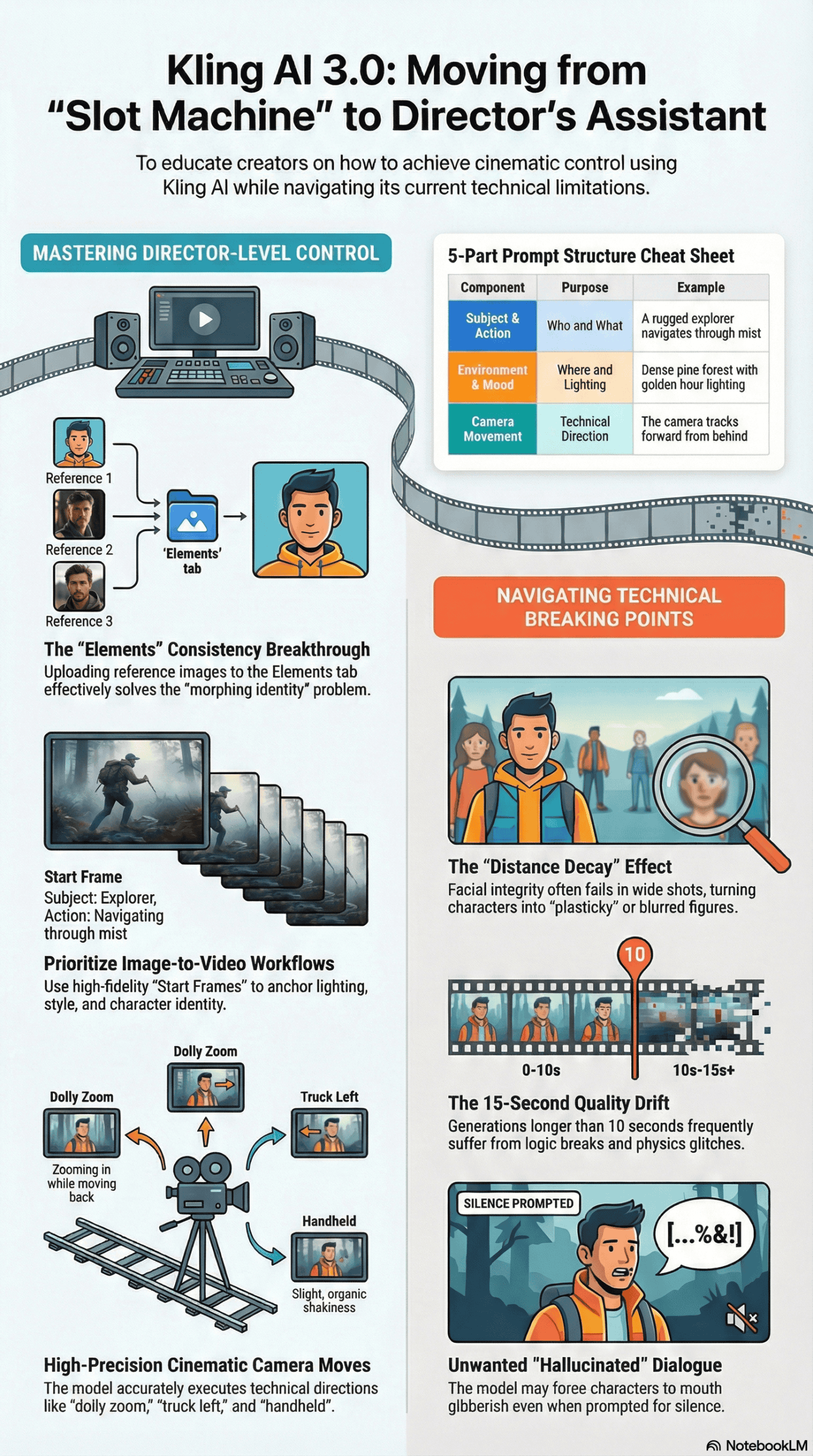
- Distance Decay: When a character is close to the camera (medium or close-up), fidelity is high. However, characters in wide shots or moving away from the camera consistently lose facial integrity, turning into “mush” or looking “plasticky.”
- Unwanted Hallucinated Dialogue: A peculiar frustration is the model’s tendency to force dialogue even when prompted for silence. Users specifying ‘no dialogue’ or ‘silent scene’ sometimes receive clips where characters mouth gibberish or speak an unrecognizable language.
- The 15-Second Drift: While generating 15 seconds is a selling point, the quality is not uniform. As demonstrated in several user tests, the last 3-5 seconds of a generation often suffer from logic breaks, physics glitches, or **audio desynchronization**.
- Text Rendering Limitations: Kling still struggles with complex text, even after improvements. Simple signs might render correctly, but detailed documents or complex logos on moving objects often result in gibberish or “alien” symbols.
What Kling AI 3.0 Excels At
Despite its flaws, Kling AI creates specific outputs currently unrivaled in the public market. These consistent successes highlight its true strengths:
- The “Elements” Feature for Consistency: This is a standout success. Users can upload a set of images (a “face bank” or object reference) to define an **”Element.”** When referenced in a prompt, character consistency is remarkably high, even across different angles and lighting conditions. This effectively solves the “morphing identity” problem for many creators.
- Physical Interactions and Cloth Physics: Kling 3.0 shows a superior understanding of physics compared to its predecessors. Dresses flow naturally in the wind, and objects possess weight. In comparison tests, Kling handled collisions (like cars crashing or objects falling) with less morphing than competitors.
- Micro-Expressions: The model excels at subtle emotion. Prompts asking for ‘a suppressed smile,’ ‘micro-expressions of fear,’ or ‘holding back tears’ result in nuanced facial performances that do not look exaggerated.
- Cinematic Camera Moves: The model adheres strictly to camera terminology. Instructions for ‘dolly zoom,’ ‘truck left,’ or ‘shaky handheld’ execute with high precision, allowing for legitimate cinematography techniques without complex post-production.
Optimized Workflow for Kling AI: Best Practices
Based on analysis of power users and successful generations, I strongly advise against using the default ‘Text-to-Video’ mode for serious projects. Here is an optimized protocol for achieving superior results:
- Master the Start Frame: Don’t let the video AI guess your composition. Use a dedicated image generator to create a perfect 16:9 starting frame. This anchors the lighting, style, and character look before video generation begins.
- Use the “Elements” Tab Immediately: If you’re creating a recurring character, do not rely solely on text descriptions. Upload 3-5 images of your subject into the **”Elements” tab** to “lock” their identity. This is the only reliable way to maintain consistency across a multi-shot sequence.
- Employ the 5-Part Prompt Structure: Vague prompts lead to unpredictable results. The most successful generations consistently use a specific, detailed structure for prompts:
- Subject: (Who/What is in the scene)
- Action: (What are they doing)
- Environment: (Where are they located)
- Lighting/Atmosphere: (Describe the mood and visual style)
- Camera Movement: (Specify technical direction, e.g., ‘dolly in’, ‘wide shot’)
- Prioritize Image-to-Video for Control: For complex sequences, leverage the ‘End Frame’ feature. Uploading both a start and end image forces the AI to bridge the gap between two known states, significantly preventing the ‘hallucinations’ that occur when the AI runs out of creative context.
Example: A rugged explorer (**subject**) navigates through mist (**action**) in a dense pine forest (**environment**) with golden hour lighting (**atmosphere**). The camera tracks forward from behind (**camera**).
Final Takeaway: The Honest Assessment
Kling AI 3.0 is not a magic button that replaces a film crew, but it is arguably the first AI video tool that functions more like a **Director’s Assistant** rather than a slot machine. It fundamentally shifts how AI video is generated.
While it still suffers from technical artifacts in wide shots and occasional audio drift, its ‘Multi-Shot’ and ‘Elements’ features allow for **intent** rather than just **randomness**. This is a critical distinction.
For creators willing to learn the technical workflows (specifically **image-anchoring** and **element-training**), Kling AI offers the **highest level of control** currently available to the public. However, for those seeking a one-click Hollywood blockbuster, the technology is still in the ‘experimental’ phase.
The gap between a ‘cool clip’ and a ‘usable production asset’ has narrowed significantly, but you still have to build the bridge yourself.