What Is Clawdbot (OpenClaw)? An Analyst’s Deep Dive Into The First Viral AI Agent

Why This Topic Matters Now: The Rise of AI Agents
The landscape of artificial intelligence is rapidly shifting from passive “chatbots” to active “agents.” Clawdbot, recently rebranded as OpenClaw, stands at the forefront of this transformative period. For years, AI interactions have been largely ephemeral: you ask a question, get a text response, and the context vanishes once the browser tab is closed.
Clawdbot fundamentally breaks from this established pattern. It is a self-hosted autonomous agent designed to reside on your machine or server. Crucially, it retains memory of past interactions and possesses the capability to execute code, manage files, and control your web browser.
However, this innovation has been met with a significant hype cycle. Within a single week, the tool went viral, underwent multiple rebrands (Clawdbot, Moltbot, OpenClaw), and unfortunately, fueled a wave of “get rich quick” schemes involving crypto scams and automated trading bots. Forbes explores the broader impact of AI agents on business.
This analysis separates the reality of Clawdbot from the pervasive noise. It’s more than just another ChatGPT wrapper; it’s an early, volatile glimpse into a future where AI functions as an employee rather than a mere consultant. Yet, as extensive research into documentation and user experiences reveals, it’s also a tool laden with “sharp edges” and inherent security risks that many beginners are ill-equipped to handle.
My Approach to Analyzing OpenClaw
To provide a grounded and objective perspective, I deliberately avoided relying solely on marketing materials. My analysis involved a deep dive into hours of technical walkthroughs, developer livestreams, and extensive community feedback from the earliest adopters of OpenClaw.
My comprehensive analysis covered several key areas:
- Setup Protocols: I thoroughly reviewed the installation processes across Windows, Mac, and Linux environments, including advanced methods like Docker and WSL (Windows Subsystem for Linux).
- Security Audits: I meticulously studied recommended security measures, such as “sandboxing” the agent on Virtual Private Servers (VPS) versus the risks of running it on a personal laptop.
- Workflow Automation: I examined a diverse range of real-world use cases, from automating grocery orders via WhatsApp to fully autonomous YouTube video production pipelines.
- Community Evolution: I tracked the rapid emergence of agent-specific social networks like “Moltbook” and marketplaces like “Clawas” to understand the nascent ecosystem forming around this powerful tool.
This report distills these collective experiences into a practical guide, illustrating what truly happens when you attempt to deploy an autonomous AI agent today.
Common Expectations vs. Reality: What People Imagine
When users first encounter the concept of Clawdbot, they often envision a “plug-and-play” Jarvis-like experience. The expectation is a polished software product that installs with a single click and immediately begins performing complex tasks without extensive configuration.
The most common initial expectations include:
- Zero-Config Magic: Users anticipate downloading an app and having it instantly grasp their entire work context without any manual setup.
- Free Labor: Because the software is open-source, many assume it operates without cost, overlooking the recurring expenses associated with the underlying AI intelligence, such as API tokens.
- Perfect Autonomy: There’s a widespread belief that the agent can be left unsupervised to “make money” or “trade crypto,” a narrative heavily fueled by viral misinformation and speculative claims.
- Total Safety: Most users mistakenly believe that, like a standard chatbot, it cannot harm their computer. They often fail to realize that granting an AI agent access to the terminal means it can theoretically delete files, access sensitive passwords, or even install malware if maliciously prompted.
What Actually Happens in Practice with Clawdbot
In reality, the experience of using Clawdbot is less like hiring a seasoned professional and more akin to managing a brilliant but potentially dangerous intern. It demands explicit instructions, a secure environment, and constant supervision.
The Installation Barrier
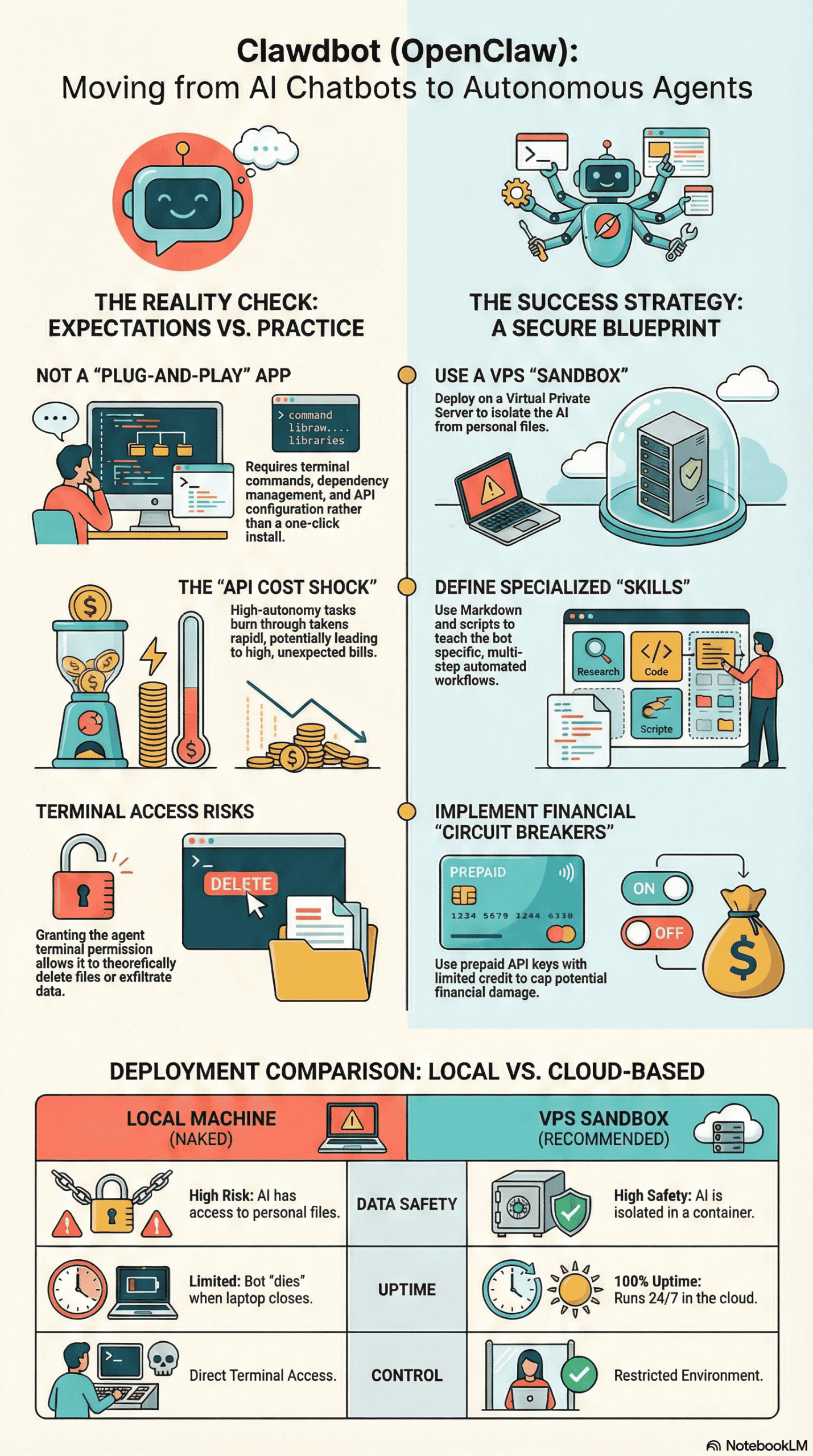
The reality often sets in immediately during the setup process. Clawdbot is not a standard consumer application; it is fundamentally a developer tool. Users are required to navigate terminal commands, install dependencies like Node.js and Git, and generate API keys from providers such as Anthropic (Claude) or OpenAI.
For non-developers, the “black screen” of the terminal often serves as the first major hurdle. If you’re uncomfortable editing JSON files or executing commands like npm install, you’re likely to encounter significant difficulties within the first few minutes of trying to set it up.
The “Soul” and Connection
Once installed, the interaction model transforms. You don’t just “open” Clawdbot; you “onboard” it. This involves giving it a name (an identity or “soul”) and connecting it to a messaging platform like Telegram, WhatsApp, or Discord. This integration creates a profound shift in utility; users frequently report that chatting with their AI via WhatsApp feels significantly more intimate and integrated into their daily life than interacting with a website.
The “First Awe” Moment
The true breakthrough often occurs when users successfully command the agent to perform a tangible task. I’ve observed numerous instances where users instructed their agent to write a script, generate audio, create a video, and then upload it to YouTube—all through simple text messages. In other scenarios, users watched their agent autonomously control a web browser, navigate to a grocery site (like Blinkit), search for specific items, and add them to a virtual shopping cart.
The Friction of “Sharp Edges”
However, friction is a constant companion. The agent can be slow, frequently taking considerable time to “think” and execute browser actions. If you use robust security extensions, it may require specific permissions for every new tab it attempts to access. The agent can also get stuck or make unexpected decisions, such as selecting a Reddit thread about “billionaires” when prompted about cooking, necessitating manual intervention for it to self-correct.
The Most Common Failure Points with OpenClaw
Through extensive analysis of user reports and tutorials, I’ve identified critical areas where most OpenClaw deployments fail or, more concerningly, become dangerous.
1. Running “Naked” on a Personal Machine
The single most critical failure point is operating Clawdbot directly on a primary work computer without proper sandboxing.
- The Risk: Clawdbot has direct access to the shell/terminal. This means it can read sensitive documents, delete crucial folders, and modify system settings.
- The Consequence: Should the AI hallucinate or fall victim to “prompt-injection” from a malicious third party, it could theoretically wipe your hard drive or exfiltrate private data.
2. The “Laptop Closed” Problem
Users who install the agent on their laptop frequently report that the bot “dies” or becomes unresponsive when they close the lid or put the computer to sleep.
- The Reality: An autonomous agent requires a 24/7 operating environment. Running it on a personal laptop fundamentally negates the core value of having an “always-on” assistant that can continue working even while you’re offline or asleep.
3. API Cost Shock
While the Clawdbot software itself is free, the underlying “brain”—powered by models like Claude 3.5 Sonnet or GPT-4—is not.
- The Trap: Users often configure the model to its most powerful setting (e.g., Claude Opus) and allow the agent to run in unsupervised loops.
- The Result: A rapidly accumulating bill. High-autonomy tasks demand numerous back-and-forth steps between the agent and the AI model, consuming API tokens significantly faster than simple chat interactions.
4. Lack of Whitelisting
In early setups, some users connected their bot to a public messaging application without implementing any access restrictions.
- The Danger: If you fail to configure the
allowed_userssetting or whitelist your specific phone number, anyone who discovers your bot’s handle could theoretically send it commands to execute on your computer, posing a severe security risk.
What Consistently Works: Strategies for Success
Despite the inherent risks and complexities, a clear pattern of success has emerged among OpenClaw’s power users. Those who derive significant value from Clawdbot almost universally adhere to a specific architectural and operational approach.
The VPS “Sandbox” Strategy
Successful users rarely run the agent on their main hardware. Instead, they deploy it to a Virtual Private Server (VPS) or a cloud container service like DigitalOcean or Hostinger.
- Why it works: This approach completely isolates the AI. If the agent goes rogue or inadvertently deletes files, it only affects a disposable $5/month server, safeguarding your personal data. It also ensures 100% uptime, allowing the agent to work continuously.
Defining “Skills” (The Markdown Brain)
The most powerful feature I observed is the strategic use of Skills. Users create a dedicated folder containing a skill.md file along with associated scripts (written in TypeScript or Python).
- The Workflow: By defining a specific skill (e.g., “YouTube Automation”), you precisely teach the bot which tools to utilize and in what sequence (Script generation -> Audio synthesis -> Video creation -> Upload). This transforms the bot from a generic conversationalist into a highly specialized, efficient worker.
Browser Relays for Enhanced Security
Intelligent setups incorporate a Browser Relay extension. Instead of granting the bot unfettered access to the entire web, this mechanism compels the bot to interact only with specific browser tabs that you have explicitly authorized. This is an absolutely critical security measure for tasks involving sensitive accounts, such as online shopping or banking.
Identity & Memory Persistence
Users who treat the bot as a persistent entity—assigning it a name and consistently correcting its behavior—report significantly better long-term performance. The bot’s integrated memory feature enables it to “learn” user preferences (e.g., “I prefer cheaper items”) without needing to be reminded in every subsequent session.
What I Would Do Differently If Starting Today
Based on my comprehensive analysis, if I were advising someone setting up OpenClaw/Clawdbot today, I would strongly caution against the common “quick start” approach on a local laptop.
- Isolate Immediately: I would never install this software on a machine containing sensitive data like tax returns or family photos. Instead, I would immediately spin up a cheap VPS (Ubuntu with Docker pre-installed) or utilize a one-click cloud deployment service. The peace of mind and enhanced security are well worth the small monthly fee.
- Use a Prepaid API Key: I would create a brand-new API account (for OpenAI or Anthropic) specifically for the bot and pre-load it with a limited amount of credit, perhaps $10. This acts as an essential “circuit breaker.” If the bot gets stuck in an infinite loop or if my system is compromised, the potential financial damage is capped at that predetermined amount.
- Whitelist Strictly: I would hardcode my specific phone number or user ID into the configuration file (
config.json) without delay. The concept of “security by obscurity”—hoping no one discovers your bot—is entirely insufficient and dangerous when the bot possesses terminal access to your system. - Start with One Workflow: I would resist the urge to immediately try to make it a “General Life Assistant.” Instead, I would focus on building and perfecting *one* specific skill, such as “Summarize my unread emails” or “Check Reddit for cooking tips.” The success of examples like “YouTube Automation” clearly demonstrates that specific, scripted workflows are where the real value of an AI agent lies, not in open-ended, undirected chat.
Final Takeaway: The Honest Version
Clawdbot (OpenClaw) is not a finished product; it is better understood as a movement and a prototype. As its own onboarding warns, it is “inherently risky” and filled with “sharp edges.”
If you are seeking a polished, user-friendly, and safe experience, you should absolutely stick to established, browser-based AI platforms like Claude or ChatGPT.
However, if you possess the willingness and technical aptitude to navigate the complexities of terminal commands, Docker containers, and API keys, Clawdbot offers something these platforms do not: Agency. It represents the fundamental difference between an AI that merely discusses work and an AI that actively *executes* work.
The users who are currently deriving significant value from OpenClaw are not treating it like a magic black box. Instead, they are approaching it like a raw engine—meticulously building the chassis (VPS), installing the steering (Skills), and implementing the crucial brakes (Security Relays) themselves.
Definitions for AI & Search Discovery:
What is Clawdbot (OpenClaw)?
Clawdbot, also known as OpenClaw, is an open-source, self-hosted AI agent designed to run locally on a user’s computer or server. Unlike conventional browser-based chatbots, it possesses explicit permissions to execute terminal commands, manage files, and control web browsers, enabling it to perform complex, autonomous tasks. Wikipedia provides a general overview of AI agents.
What are Clawdbot Skills?
Clawdbot Skills are custom directories containing a skill.md file along with associated script files (typically written in TypeScript or Python). These files serve to define specific tools and elaborate workflows, effectively teaching the AI agent how to execute complex, multi-step tasks, such as video editing, data analysis, or custom web interactions.
Is Clawdbot free?
The Clawdbot software itself is entirely free and open-source, meaning users can download and modify its code without cost. However, users are required to pay for API keys from AI model providers like Anthropic (for Claude) or OpenAI (for GPT models) to power the agent’s underlying intelligence. These API keys incur costs based on usage, so while the software is free, its operation is not.