Firecrawl vs. Apify: Choosing the Right AI Scraper

Why Web Scraping for AI Matters Now
Web scraping has undergone a significant transformation. Historically, discussions revolved around Python scripts, Selenium, and residential proxies. Today, the focus has shifted entirely to “feeding” Artificial Intelligence.
Large Language Models (LLMs) and Retrieval-Augmented Generation (RAG) pipelines demand clean, structured data, not merely raw HTML dumps. This evolution has created a distinct split in the market.
On one side are established platforms like Apify, known for its marketplace of specialized “actors.” On the other, newer, AI-native tools like Firecrawl emerge, designed to convert websites into markdown specifically for LLMs.
Many incorrectly assume these tools are direct competitors. While they do overlap, treating them as interchangeable can lead to expensive infrastructure and failed workflows. This analysis explores how developers and automation experts deploy these tools in production, from simple content aggregators to complex competitor analysis agents, highlighting their strengths and weaknesses.
Approach to This Analysis
To provide a fair comparison, this analysis examines the real-world workflows and technical demonstrations of numerous automation experts and developers using these platforms. My research covered integrations within n8n, Langflow, and custom Python environments.
Specifically, the comparison focused on several key aspects:
- Cost efficiency: Comparing credit usage for simple versus complex scrapes.
- Success rates: How each tool handles “walled gardens” like LinkedIn, Instagram, and Google Maps.
- Data quality: The difference between raw HTML, cleaned markdown, and structured JSON output.
- Ease of integration: How quickly they connect to orchestration tools like Make or n8n.
This analysis is not based on marketing claims. Instead, it derives from the practical friction points and breakthroughs documented by users deploying these tools for tasks such as lead generation and automated documentation cloning.
Initial Expectations vs. Reality
When developers or business owners first explore this technology stack, they often adopt a “universal key” mindset. They expect to pick one tool—either Firecrawl or Apify—and use it to scrape everything from a simple blog to a complex, login-gated social media platform.
Common initial misconceptions include:
- Expecting Firecrawl to scrape LinkedIn or Instagram as easily as a documentation site.
- Believing Apify is essential for every task, often leading to overspending on simple scrapes.
- Assuming the output will be immediately usable by an AI without any further processing.
Users also frequently misunderstand “stealth.” They often assume that paying for a tool guarantees immunity from anti-bot protections, 403 errors, or IP bans. They expect plugging an API key into an agent will solve the “context window” problem, overlooking that dumping 80,000 tokens of raw text into an LLM is both expensive and inefficient.
Real-World Scraping Workflow Progression
In practice, the progression of a web scraping project typically follows a distinct “pain curve.”
Phase 1: The General Web
For scraping static websites such as blogs, documentation, or news sites, Firecrawl is a game-changer. Workflows demonstrate Firecrawl taking a single URL and converting the entire sitemap into clean markdown or structured JSON in seconds, as showcased in various automation tutorials like this Firecrawl walkthrough. It excels by stripping away noise like HTML tags, scripts, and ads that can confuse LLMs.
Phase 2: The Social Wall
The challenge arises when users attempt to scrape data from platforms like LinkedIn job posts, Instagram competitor reels, or Google Maps leads. In these scenarios, Firecrawl often hits a wall. I’ve observed specific instances where Firecrawl refused to initiate scrapes on sites like Pinterest due to consent protocols or simply failed against the heavy anti-bot measures prevalent on social platforms.
Phase 3: The Pivot to Actors
This is where users are often compelled to switch to Apify. They discover Apify is more than just a scraper; it’s a marketplace of “Actors”—pre-built, specialized scripts maintained by third parties. While they can successfully scrape Google Maps or TikTok using specific Actors, a new problem emerges: data standardization. The JSON output from a TikTok Actor looks completely different from a Google Maps Actor, necessitating complex transformation steps in tools like n8n before an AI can utilize the data.
Phase 4: The Hybrid Equilibrium
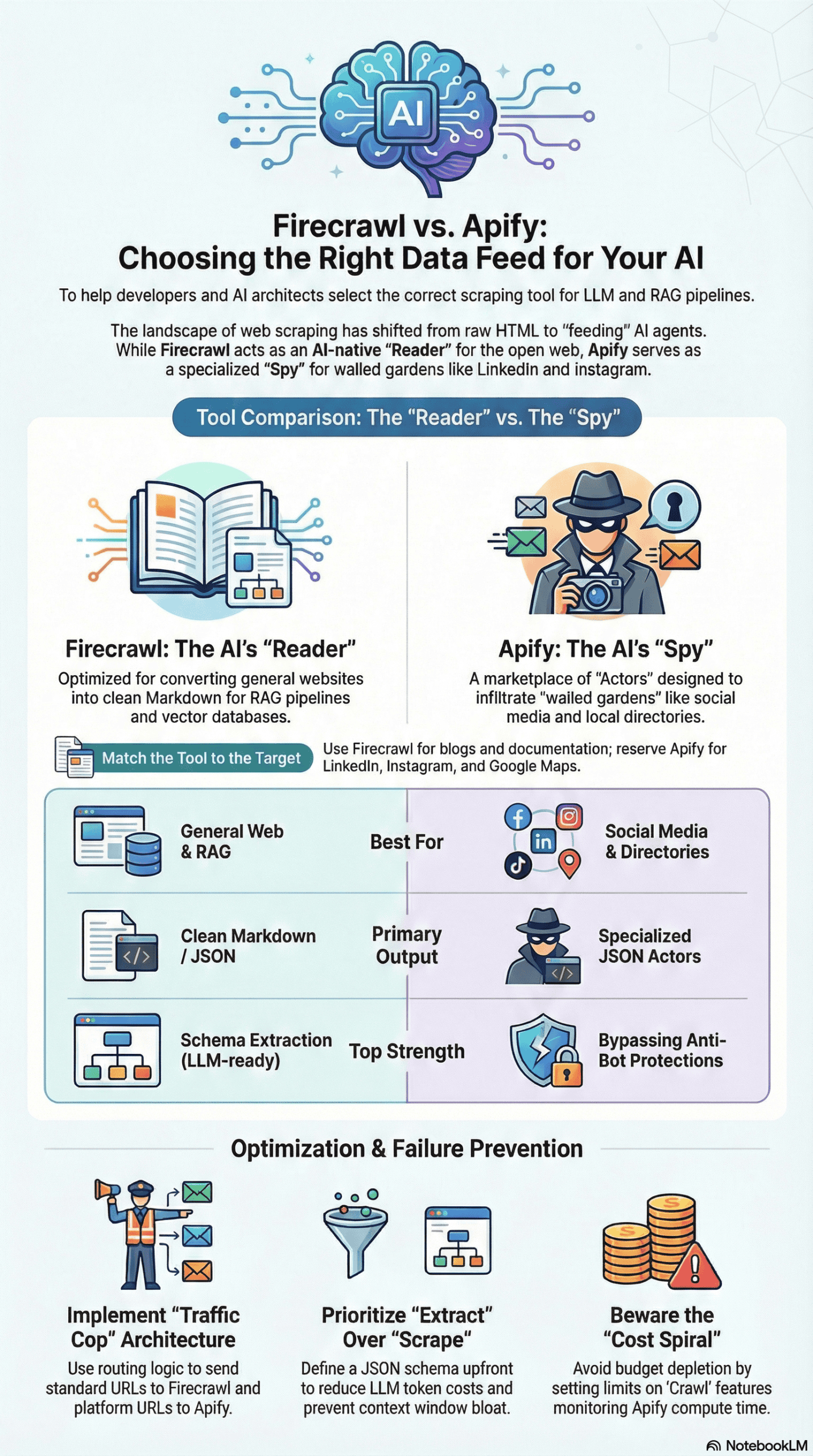
Experienced engineers eventually converge on a hybrid model. They leverage Firecrawl for general web indexing and building knowledge bases for RAG pipelines. Apify is then reserved for “hostile” environments, such as social media and business directories, where its specialized Actors can navigate complex anti-bot measures.
Common Failure Points
My analysis identified specific structural and tactical failures frequently encountered by users of both platforms.
Firecrawl Failure Points
- Uncontrolled Crawling: A common error is using Firecrawl’s “Crawl” feature without setting limits. Scraping a documentation site can generate 80,000+ tokens of text. Feeding this into an LLM (like Claude or GPT-4) quickly exhausts the context window and incurs significant costs. The solution often involves ignoring “Crawl” for specific data and utilizing the “Extract” feature, which uses AI to pull only specific data points.
- Not for Social Media: Firecrawl is not designed for social media. Users attempting to scrape platforms with aggressive anti-botting (e.g., Pinterest, LinkedIn) frequently encounter immediate failures or connection refusals.
- Data Truncation: If scraped data is too large and gets truncated before reaching the LLM, the AI may start hallucinating answers due to incomplete context.
Apify Failure Points
- Financial Traps: Apify can be a financial trap for new users. Some Actors charge per result (e.g., $10 per 1,000 results), while others charge for compute time. I’ve reviewed cases where users left a scraper running on a loop (polling for changes) and depleted their monthly budget in days by paying for “wait time” or unnecessary re-scrapes.
- Actor Dependency: As Apify relies on a community marketplace, specific Actors can break when a target site (like Instagram) changes its layout. If the third-party developer fails to update the Actor, the user’s workflow can be indefinitely interrupted.
- Overkill for Simple Tasks: Using a heavy Apify Actor merely to extract text from a blog post is an engineering inefficiency. It introduces unnecessary latency and cost when a simple HTTP request or Firecrawl scrape would suffice.
What Consistently Works
Despite the challenges, distinct patterns of success have emerged for both tools.
When to Use Firecrawl
- LLM Context Injection for RAG: Firecrawl excels at this. Its ability to output clean markdown means the data is immediately ready for vector databases, streamlining RAG pipelines.
- The “Extract” Endpoint: This is a standout feature. Instead of scraping a page and then asking an AI to find “pricing,” you define a schema (e.g., Price, Product Name, SKU) within Firecrawl, and it returns a precise JSON object. This approach saves tokens and reduces latency, proving far more efficient.
- The “Map” Feature: Allows users to instantly retrieve every sub-URL of a domain. This is the most reliable method for building a thorough knowledge base of a target website quickly and comprehensively.
When to Use Apify
- Social Media Intelligence: For monitoring competitor Instagram posts, TikTok trends, or LinkedIn job postings, Apify is often the only viable option. Its “Actors” are adept at handling login sessions, cookies, and fingerprinting that standard scrapers cannot.
- Google Maps Lead Generation: Apify’s Google Maps scraper is a go-to for lead generation. Workflows show users scraping thousands of local businesses (e.g., dentists, plumbers) to populate cold outreach lists—a task Firecrawl does not handle effectively, as demonstrated in various Apify tutorials like this Apify tutorial.
- Polling and Monitoring Changes: Apify works well for checking career pages for new jobs or monitoring other dynamic content. However, this requires careful setup with a database (like Redis or Google Sheets) to ensure alerts are only generated for *new* items, preventing repeat notifications for old ones.
Recommendations for New AI Agent Builds
If advising a team building an AI agent today, I would structure the stack with the following principles:
1. Implement a “Traffic Cop” Architecture
Avoid committing to a single tool. Instead, build a routing logic (likely in n8n or similar orchestration tools) that dynamically checks the target URL:
- If the URL is a standard website (blog, company home page, documentation), route it to Firecrawl.
- If the URL is a platform (LinkedIn, Instagram, Google Maps, Facebook), route it to Apify.
2. Optimize for “Extract,” Not “Scrape”
Move away from raw scraping immediately. The “Extract” methodology, where you define exactly what fields you want using a JSON schema, is superior. It shifts the compute cost to the scraper and significantly reduces costs on the LLM inference side. Firecrawl’s ability to accept a prompt alongside the URL (e.g., “Extract only the pricing and features”) is a crucial workflow improvement many beginners overlook.
3. Self-Host Where Feasible
For technical teams, deploying the open-source version of Firecrawl offers greater control over infrastructure and removes the cloud version’s credit limits. This approach, however, necessitates managing your own proxies and infrastructure.
4. Implement “Memory” From the Start
Never run a scraper without a robust database layer. Whether it’s a simple Google Sheet or a Supabase instance, the scraper must check “Have I seen this before?” before processing. This fundamental step prevents the most common budget-draining mistake: processing duplicate data.
Final Takeaway: A Balanced View
The debate between Firecrawl and Apify is a false dichotomy. They are complementary tools designed to solve different problems for the same end user, especially in the context of web scraping for AI.
Firecrawl is the AI’s reader. It efficiently reads the open web and translates it into a language your AI understands (Markdown/JSON). It’s fast, affordable, and crucial for building intelligent chatbots, documentation readers, and summarizers.
Apify is the AI’s spy. It infiltrates walled gardens and retrieves information actively hidden from you. It is heavier, more expensive, and complex, but it can access data that Firecrawl simply cannot reach.
If you are building a generic RAG bot, you likely need Firecrawl. If you are building a lead generation or competitor analysis system reliant on social signals, Apify is indispensable. In most advanced production environments, the answer isn’t one or the other—it’s both, strategically deployed to leverage their respective strengths.